Primary
Beauty, edited to perfection.
Beauty, edited to perfection.
Brand identity
This page holds every official logo version of Edited Beauty together with guidelines for correct use. Always use one of these versions; never modify the logo yourself.
The monogram
The monogram is an arch holding the letters E and B — the studio doorway and the editorial frame around every set of nails. It is the only element allowed to stand alone, and it never carries a second colour.
Default profile picture for Instagram, Google and WhatsApp: the ink monogram on a cream square. The download is a square canvas with the monogram centred; platforms crop it to a circle themselves.
The arch stays legible down to 16 px on screen and 6 mm in print. Below that, use the wordmark instead.
Logo versions
Each version exports as SVG, PNG, WEBP or JPG, in web or print resolution, with a transparent or custom background.
Default version on cream. Use this wherever possible: website, price cards, window and correspondence.
SVG is the vector file — open or place it directly in Illustrator. Web = compact for screen, print = high resolution (300 dpi). SVG, PNG and WEBP export transparent; JPG always uses the selected background colour.
Ink lockup on white or cream. Use it for documents, invoices and anywhere maximum contrast is required.
SVG is the vector file — open or place it directly in Illustrator. Web = compact for screen, print = high resolution (300 dpi). SVG, PNG and WEBP export transparent; JPG always uses the selected background colour.
White lockup for dark surfaces and photography. The safest version on top of imagery.
SVG is the vector file — open or place it directly in Illustrator. Web = compact for screen, print = high resolution (300 dpi). SVG, PNG and WEBP export transparent; JPG always uses the selected background colour.
Gold lockup on ink for premium carriers: gift cards, packaging and evening campaigns.
SVG is the vector file — open or place it directly in Illustrator. Web = compact for screen, print = high resolution (300 dpi). SVG, PNG and WEBP export transparent; JPG always uses the selected background colour.
Monogram left, wordmark right. For narrow spaces such as website headers, email signatures and banners.
SVG is the vector file — open or place it directly in Illustrator. Web = compact for screen, print = high resolution (300 dpi). SVG, PNG and WEBP export transparent; JPG always uses the selected background colour.
Without the monogram, for very wide and shallow applications and for sizes where the arch would close up.
SVG is the vector file — open or place it directly in Illustrator. Web = compact for screen, print = high resolution (300 dpi). SVG, PNG and WEBP export transparent; JPG always uses the selected background colour.
For favicons, social avatars and places where the name already appears elsewhere. Never smaller than 16 px.
SVG is the vector file — open or place it directly in Illustrator. Web = compact for screen, print = high resolution (300 dpi). SVG, PNG and WEBP export transparent; JPG always uses the selected background colour.
Solid arch with the EB reversed out. Made for the smallest and roughest reproductions: embroidery, vinyl cutting, vehicle lettering, stamps and textile print, where the hairline version fills in. Below 12 px it collapses gracefully into the pure arch.
SVG is the vector file — open or place it directly in Illustrator. Web = compact for screen, print = high resolution (300 dpi). SVG, PNG and WEBP export transparent; JPG always uses the selected background colour.
Single-colour black for stamps, engraving, embossing and black-and-white printing.
SVG is the vector file — open or place it directly in Illustrator. Web = compact for screen, print = high resolution (300 dpi). SVG, PNG and WEBP export transparent; JPG always uses the selected background colour.
Single-colour white for dark surfaces, etched glass and single-colour textile print.
SVG is the vector file — open or place it directly in Illustrator. Web = compact for screen, print = high resolution (300 dpi). SVG, PNG and WEBP export transparent; JPG always uses the selected background colour.
Default profile picture for Instagram, Google and WhatsApp: ink monogram on cream, 512 × 512 px.
SVG is the vector file — open or place it directly in Illustrator. Web = compact for screen, print = high resolution (300 dpi). SVG, PNG and WEBP export transparent; JPG always uses the selected background colour.
Alternative profile picture for dark environments: gold monogram on ink. Use it only when the light avatar lacks contrast.
SVG is the vector file — open or place it directly in Illustrator. Web = compact for screen, print = high resolution (300 dpi). SVG, PNG and WEBP export transparent; JPG always uses the selected background colour.
Edited Beauty · Weteringstraat 45H · 1017 SM Amsterdam
KvK 99015870 · VAT NL868749849B01 · info@editedbeauty.eu
Compact, quiet version with the business details. Place it top left on invoices, letters and rental agreements.
SVG is the vector file — open or place it directly in Illustrator. Web = compact for screen, print = high resolution (300 dpi). SVG, PNG and WEBP export transparent; JPG always uses the selected background colour.
Clear space
Brand lines
The primary line is always used in English. The supporting line is used in the language of the page.
Primary
Beauty, edited to perfection.
Supporting — Dutch
Jouw moment. Jouw stijl. Tot in detail verzorgd.
Supporting — English
Your moment. Your style. Perfected in every detail.
Brand hierarchy
01
The nail studio always leads. Manicures, BIAB, gel, extensions and nail art are the core of the brand and take first position in navigation, imagery and messaging.
02
Supporting treatments that complete the nail experience. Always presented after the nail offer, never as the headline.
03
Independent hairstylists renting a workspace inside Edited Beauty. Presented as part of the location, never as a second brand or as staff of the studio.
Colour
Typography
Display — Urbanist
Aa
Beauty, edited to perfection.
Headlines, brand lines and treatment names. Light to medium weights (300–500), tight leading, generous letter-spacing on short lines — never uppercase for long text.
Body — Quicksand
Aa
Body copy, navigation, buttons and labels. Weights 400–600. Eyebrow labels use uppercase with 0.22em letter-spacing.
Both faces are free under the SIL Open Font License. Install at least Quicksand Regular (400), Medium (500) and SemiBold (600).
Fixed copy for Instagram, Facebook and Google Business Profile. Use it exactly as written so every field stays within the platform character limits.
13/75
Edited Beauty
Exact studio name, without additions such as B.V. or a city.
Nail Salon · Beauty Salon · Hair Salon
Enter them in this order; Facebook allows three categories at most.
184/255
Edited Beauty is a premium nail studio in Amsterdam. Manicures, BIAB, gel, extensions and nail art, plus brows and pedicure. Hair Studio inside the salon. Beauty, edited to perfection.
The main bio field. Facebook allows up to 255 characters here.
63/101
Premium nail studio in Amsterdam. Beauty, edited to perfection.
For places where the bio is truncated, such as the mobile app and search.
115/150
Premium nail studio · Amsterdam ✦ BIAB, gel, extensions & nail art ✦ Brows · pedicure · hair studio ✦ Book online ↓
Instagram allows only 150 characters; this version also works on TikTok and X.
260/255
Edited Beauty is a premium nail studio at Weteringstraat 45H in Amsterdam. Manicures, BIAB, gel, extensions and nail art, with brows and pedicure as additional services and independent hairstylists in our Hair Studio. Book online or email info@editedbeauty.eu.
Longer copy for the About tab and Google Business Profile.
14/50
byeditedbeauty
Keep it identical across channels.
https://editedbeauty.eu
Always include https:// so platforms validate the link correctly.
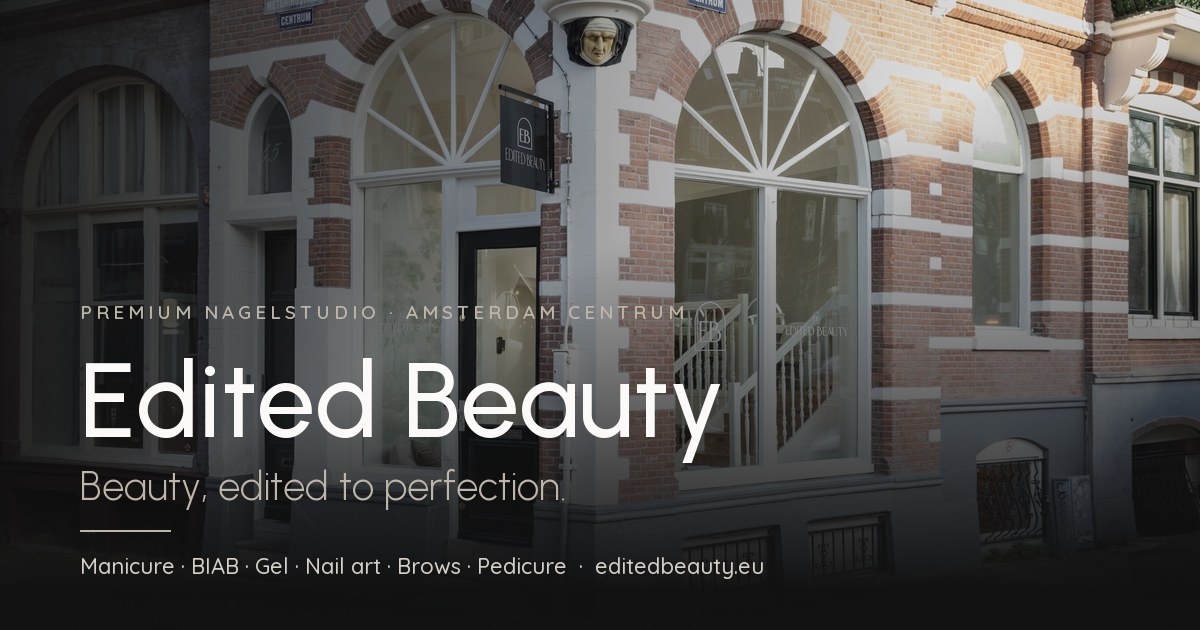
This exact 1200 × 630 px file is the og:image of editedbeauty.eu — the preview WhatsApp, Facebook, LinkedIn and X show. Use the same image as the social image everywhere.
Social images
The studio front on Weteringstraat, an ink scrim and the lockup centred inside the safe zone. The preview and the downloaded file come from the same renderer, so what you see is exactly what you get. Web is the platform size; print doubles it for retina and campaign use.
1200 × 630 px
The image WhatsApp, Facebook, LinkedIn and X show when the website is shared. This is the file the site uses.
1200 × 630 px
Same crop without the lockup, for ads and campaigns where the platform adds its own title and logo.
1200 × 1200 px
Instagram and Facebook feed post, and any square placement in Google Business Profile.
1200 × 1200 px
Square crop without the lockup, so treatment copy or a price can be set on top.
1640 × 856 px
Cover photo; the lockup sits above the safe line so the profile picture never covers it.
1640 × 856 px
Cover photo without the lockup, for seasonal campaigns and openings.
Keep text and the lockup inside the safe zone: platforms crop covers differently per device. The shared-link image is already installed on the website; changed previews only appear in shared links once the platform re-scrapes the page.
One fixed QR code for all print, the studio window and the price cards. It opens editedbeauty.eu with UTM parameters, so analytics show when a visitor arrives through a QR code. Error correction is set to level H, which keeps the code readable with the monogram in its centre.
Target URL with tracking
https://editedbeauty.eu/?utm_source=qr&utm_medium=print&utm_campaign=editedbeauty_qr
Default. For business cards, price cards, window stickers and flyers on light surfaces.
The same code without a background, to place on a light photo or a cream colour block.
For dark carriers. Note: some older scanners struggle with inverted codes — always test.
Use SVG for print (vector, infinitely scalable; that variant is always without the monogram for maximum scan reliability). Print the code at 25 × 25 mm or larger, keep a quiet zone of four modules around it and always test the printed result on two phones.
Brand applications
Fixed specifications for the sign maker, the printer and the packaging supplier. Always supply vector artwork (SVG) from this page.
Tone of voice
| Do | Don’t |
|---|---|
| Calm, precise, editorial | Loud, salesy, exclamation marks |
| Detail-led craft language | Generic beauty clichés |
| Dutch first, English mirrored | Mixing both languages in one sentence |
| Facts: prices, duration, hygiene | Unverifiable promises or guarantees |
Business facts